1
2
3
4
5
6
7
8
9
10
11
12
13
14
15
16
17
18
19
20
21
22
23
24
25
26
27
28
29
30
31
32
33
34
35
36
37
38
39
40
41
42
43
44
45
46
47
48
49
50
51
52
53
54
55
56
57
58
59
60
61
62
63
64
65
66
67
68
69
70
71
72
73
74
75
76
77
78
79
80
81
82
83
84
85
86
87
88
89
90
91
92
93
|
[](https://travis-ci.com/isacikgoz/gitbatch) [](/LICENSE) [](https://goreportcard.com/report/github.com/isacikgoz/gitbatch)
## gitbatch
Aim of this tool to make your local repositories synchronized with remotes easily. Inspired from lazygit and I build this according to my needs; Since my daily work is tied to many repositories I often end up walking on many directories and manually pulling updates etc. To make this routine faster, I created a simple tool to handle this job. I really enjoy working on this project and I hope it will be a useful tool.
**Disclaimer**
- Authentication required repositories are **not supported** using ssh is recommended if you need to authenticate to fetch/pull
- [Connecting to GitHub with SSH](https://help.github.com/articles/connecting-to-github-with-ssh/)
- [GitLab and SSH keys](https://docs.gitlab.com/ee/ssh/)
- [BitBucket Set up an SSH key](https://confluence.atlassian.com/bitbucket/set-up-ssh-for-git-728138079.html)
- Some strange behavior is expected and feedbacks are welcome. For now, known issues are:
- At very low probability app fails to load repositories, try again it will open next time (multithreading problem)
- Sometimes when you scroll too fast while pulling/fetching/merging, some multithreading problem occurs and app crashes (will fix soon)
- colors vary to your terminal theme colors, so if the contrast is not enough on some color decisions; discussions are welcome
Here is the screencast of the app:
[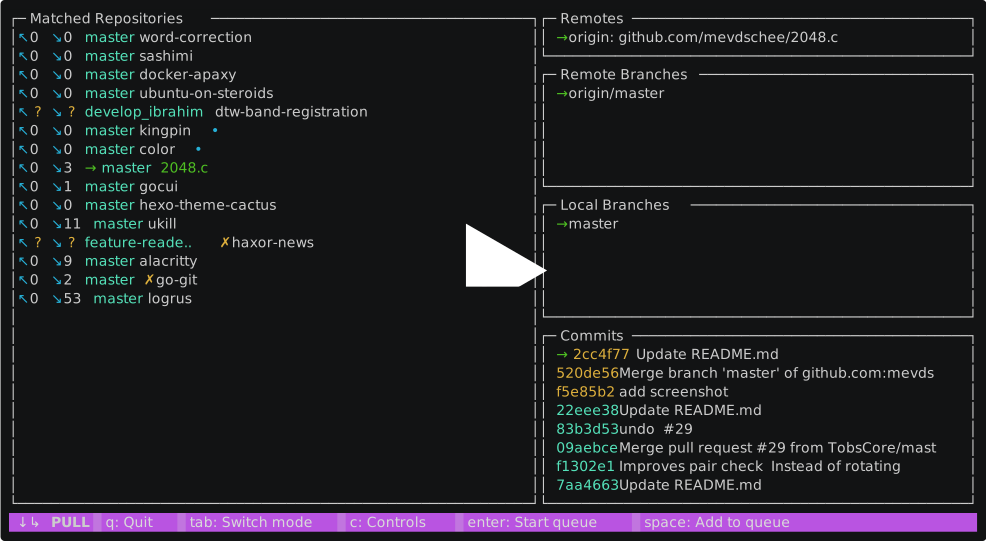](https://asciinema.org/a/B4heYReiNgqwUbWL2RYnTzt5H)
## installation
for now, installation requires golang compiler and minimum golang 1.10 is recommended.
- if you don't have golang installed refer to [golang.org](https://golang.org/dl/)
- you should have $GOPATH env variable set and your $PATH includes $GOPATH/bin
to install run the command;
```bash
go get -u github.com/isacikgoz/gitbatch
```
I prefer using gopath like this in my zshrc or bashrc;
```bash
export GOPATH=$HOME/go
export PATH=$PATH:$GOPATH/bin
```
## Use
run the `gitbatch` command from the parent of your git repositories. For start-up options simply `gitbatch --help`
### Controls
- **tab**: Switch mode
- **↑** or **k**: Up
- **↓** or **j**: Down
- **b**: Iterate over branches
- **r**: Iterate over remotes
- **e**: Iterate over remote branches
- **s**: Iterate over commits
- **d**: Show commit diff
- **c**: Controls or close windows if a pop-up window opened
- **enter**: Start queue
- **space**: Add to queue
- **ctrl + c**: Force application to quit
- **q**: Quit
### Modes
- **FETCH**: fetches the selected **remote** e.g. *Origin*, *Upstream*, etc.
- **PULL**: fetches the selected **remote** and merges selected **remote branch** into **active branch** e.g. origin/master → master
- **MERGE**: merges the selected **remote branch** into **active branch** e.g. origin/master → master
### Display
#### Repository Screen
↖ 0 ↘ 0 → master ✗ ips.server.slave.native •
↖ (pushables) ↘ (pullables) → (branch) (✗ if dirty) (repository folder name) (• if queued)
- if pushables or pullables appear to be "**?**", that means no upstream configured for the active branch
- to resolve this issue;
1. change directory the repository and checkout to the branch prints **?** on upstream
2. make sure remote is set by running `git remote -v`
3. run `git config --local --add branch.<your branch name>.remote=<your remote name>`
4. run `git config --local --add branch.<your branch name>.merge=refs/heads/<your branch name>`
- the queued indicator color represents the operation same as mode color
#### Commit Screen
- if hash color is cyan it means that commit is a local commit, if yellow it means it is a commit that will merge in to your active branch if you pull or merge
- you can see the diff by simply pressing **d** on the selected commit
## Further goals
- add testing
- select all feature
- arrange repositories to an order e.g. alphabetic, last modified, etc. ✔
- shift keys, i.e. **s** for iterate **alt + s** for reverse iteration ✔
- recursive repository search from the filesystem
- full src-d/go-git integration (*having some performance issues*)
- implement config file to pre-define repo locations or some settings
- resolve authentication issues
## Credits
- [go-git](https://github.com/src-d/go-git) for git interface
- [gocui](https://github.com/jroimartin/gocui) for user interface
- [logrus](https://github.com/sirupsen/logrus) for logging
- [lazygit](https://github.com/jesseduffield/lazygit) as app template
- [color](https://github.com/fatih/color) for colored text
- [kingpin](https://github.com/alecthomas/kingpin) for command-line flag&options
|
