1
2
3
4
5
6
7
8
9
10
11
12
13
14
15
16
17
18
19
20
21
22
23
24
25
26
27
28
29
30
31
32
33
34
35
36
37
38
39
40
41
42
43
44
45
46
47
48
49
50
51
52
53
54
55
56
57
58
59
60
61
62
63
64
65
66
67
68
69
70
71
72
73
74
75
76
77
78
79
80
81
82
83
84
85
86
87
88
89
90
91
92
93
94
95
96
97
98
99
100
101
102
103
104
105
106
107
108
109
110
111
112
113
114
115
116
117
118
119
120
121
122
123
124
125
126
127
128
129
130
131
132
133
134
135
136
137
138
139
140
141
142
143
144
145
146
147
148
149
150
151
152
153
154
155
156
157
158
159
160
161
162
163
164
165
166
167
168
169
170
171
172
173
174
175
176
177
178
179
180
181
182
183
184
185
186
187
188
189
190
191
192
193
194
195
196
197
198
199
200
201
202
203
204
205
206
207
208
209
210
211
212
213
214
215
216
217
218
219
220
221
222
223
224
|
title: Porting GuixSD to ARMv7
date: 2017-12-22 14:00
author: Mathieu Othacehe
tags: ARM, Cross-compilation
---
GuixSD porting to ARMv7 is a difficult topic. There are plenty of
different machines, with specific hardware configurations and
vendor-tuned bootloaders, and ACPI support is still experimental. For
those reasons it is currently impossible to provide a GuixSD image
that runs on most ARMv7 machines like on x86_64 targets.
The GuixSD port on ARMv7 has to be done machine by machine and the
first supported one is the BeagleBone Black. It was choosen mainly
because it runs with mainline U-Boot and Linux-libre kernel.
As Guix already supported armv7, only three things were missing:
1. A rework of the GuixSD bootloader layer to support not just GRUB but
also U-Boot and Extlinux. This has been integrated in the [0.14
release](https://www.gnu.org/software/guix/blog/2017/gnu-guix-and-guixsd-0.14.0-released/).
2. Some developments and fixes on Guix scripts to support image generation,
system reconfiguration and installation on ARMv7 in the same way as it is
already possible on i686 and x86_64 machines.
3. The definition on an installation image for the BeagleBone Black.
Points 2 and 3 were addressed recently so we are now ready to show you
how to run GuixSD on your BeagleBone Black board!
#### Installing GuixSD on a BeagleBone Black
Let's try to install GuixSD on the 4GB eMMC (built-in flash memory) of
a BeagleBone Black.
Future Guix releases will provide pre-built installer images for the
BeagleBone Black. For now, as support just landed on "master", we need
to build this image by ourselves.
This can be done this way:
```
guix system disk-image --system=armhf-linux -e "(@ (gnu system install) beaglebone-black-installation-os)"
```
Note that it is not yet possible to cross-compile a disk image. So you
will have to either run this command on an armhf-linux system where
you have previously installed Guix manually, or offload the build to such a
system.
You will eventually get something like:
```
installing bootloader...
[ 7710.782381] reboot: Restarting system
/gnu/store/v33ccp7232gj5wdahdgpjcw4nvh14d7s-disk-image
```
Congrats! Let's flash this image onto a microSD card with the command:
```
dd if=/gnu/store/v33ccp7232gj5wdahdgpjcw4nvh14d7s-disk-image of=/dev/mmcblkX bs=4M
```
where mmcblkX is the name of your microSD card on your GNU/Linux machine.
You can now insert the microSD card into you BeagleBone Black, plug in a
UART cable and power-on your device while pressing the "S2" button to
force the boot from microSD instead of eMMC.
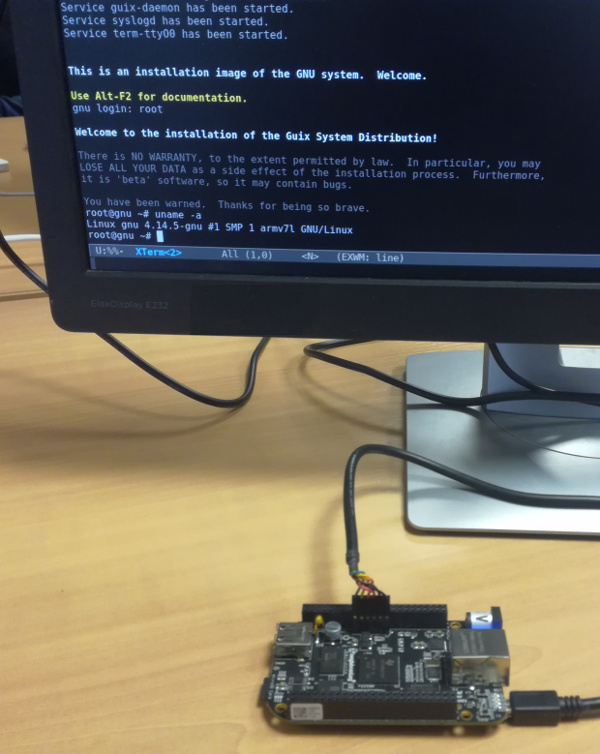
Let's follow the [Guix documentation
here](https://www.gnu.org/software/guix/manual/en/html_node/Preparing-for-Installation.html#Preparing-for-Installation)
to install GuixSD on eMMC.
First of all, let's plug in an ethernet cable and set up SSH access in order to
be able to get rid of the UART cable.
```
ifconfig eth0 up
dhclient eth0
herd start ssh-daemon
```
Let's partition the eMMC (/dev/mmcblk1) as a 4GB ext4 partition,
mount it, and launch the cow-store service, still following the
documentation.
```
cfdisk
mkfs.ext4 -L my-root /dev/mmcblk1p1
mount LABEL=my-root /mnt
herd start cow-store /mnt
```
We have reached the most important part of this whole process. It is now
time to write the configuration file of our new system.
The best thing to do here is to start from the template
`beaglebone-black.scm`:
```
mkdir /mnt/etc
cp /etc/configuration/beaglebone-black.scm /mnt/etc/config.scm
zile /mnt/etc/config.scm
```
Once you are done preparing the configuration file, the new system must be initialized
with this command:
```
guix system init /mnt/etc/config.scm /mnt
```
When this is over, you can turn off the board and remove the microSD card. When you'll
power it on again, it will boot a bleeding edge GuixSD---isn't that nice?
#### Preparing a dedicated system configuration
Installing GuixSD on eMMC is great but you can also use Guix
to prepare a portable microSD card image for your favorite server configuration. Say
you want to run an mpd server on a BeagleBone Black directly from microSD card,
with a minimum of configuration steps.
The system configuration could look like this:
```scheme
(use-modules (gnu) (gnu bootloader extlinux))
(use-service-modules audio networking ssh)
(use-package-modules screen ssh)
(operating-system
(host-name "my-mpd-server")
(timezone "Europe/Berlin")
(locale "en_US.utf8")
(bootloader (bootloader-configuration
(bootloader u-boot-beaglebone-black-bootloader)
(target "/dev/sda")))
(initrd (lambda (fs . rest)
(apply base-initrd fs
;; This module is required to mount the sd card.
#:extra-modules (list "omap_hsmmc")
rest)))
(file-systems (cons (file-system
(device "my-root")
(title 'label)
(mount-point "/")
(type "ext4"))
%base-file-systems))
(users (cons (user-account
(name "mpd")
(group "users")
(home-directory "/home/mpd"))
%base-user-accounts))
(services (cons* (dhcp-client-service)
(service mpd-service-type)
(agetty-service
(agetty-configuration
(extra-options '("-L"))
(baud-rate "115200")
(term "vt100")
(tty "ttyO0")))
%base-services)))
```
After writing this configuration to a file called `mpd.conf`, it's possible to
forge a disk image from it, with the following command:
```
guix system disk-image --system=armhf-linux mpd.conf
```
Like in the previous section, the resulting image should be copied to a microSD card.
Then, booting from it on the BeagleBone Black, you should get:
```
...
Service mpd has been started.
This is the GNU system. Welcome.
my-mpd-server login:
```
With only two commands you can build a system image from a configuration file, flash it
and run it on a BeagleBone Black!
#### Next steps
* Porting GuixSD to other ARMv7 machines.
While most of the work for supporting ARMv7 machines is done, there's
still work left to create specific installers for other machines.
This mostly consists of specifying the right bootloader and initrd
options, and testing the whole thing.
One of the next supported systems might be the
[EOMA68-A20](https://www.crowdsupply.com/eoma68/micro-desktop) as we
should get a pre-production unit soon. Feel free to add
support for your favorite machine!
This topic will be discussed in a future post.
* Allow system cross-compilation.
This will be an interesting feature to allow producing a disk image from
a desktop machine on x86_64 for instance. More development work is needed,
but we'll keep you informed.
#### About GNU Guix
[GNU Guix](https://www.gnu.org/software/guix) is a transactional package
manager for the GNU system. The Guix System Distribution or GuixSD is
an advanced distribution of the GNU system that relies on GNU Guix and
[respects the user's
freedom](https://www.gnu.org/distros/free-system-distribution-guidelines.html).
In addition to standard package management features, Guix supports
transactional upgrades and roll-backs, unprivileged package management,
per-user profiles, and garbage collection. Guix uses low-level
mechanisms from the Nix package manager, except that packages are
defined as native [Guile](https://www.gnu.org/software/guile) modules,
using extensions to the [Scheme](http://schemers.org) language. GuixSD
offers a declarative approach to operating system configuration
management, and is highly customizable and hackable.
GuixSD can be used on an i686, x86_64 and armv7 machines. It is also
possible to use Guix on top of an already installed GNU/Linux system,
including on mips64el and aarch64.
|
